
AI Agents for Small Business: What Gartner’s 40% Forecast Means for a 50-Person Company
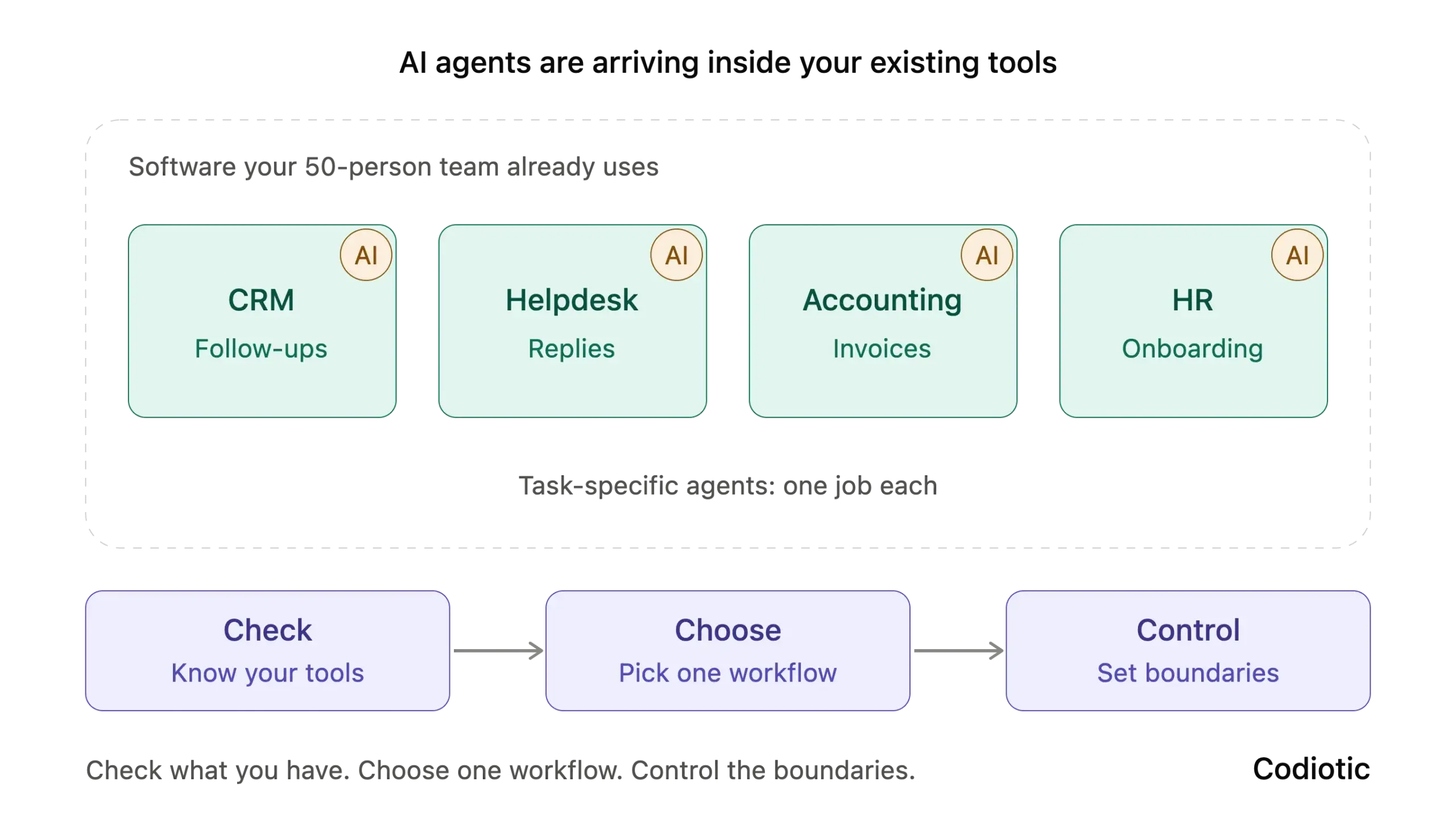
Over the past year, one forecast has appeared in almost every conversation about business AI. Gartner predicts that 40% of enterprise applications will include task-specific AI agents by the end of 2026, up from less than 5% in 2025.
It is a striking number. But if you run a company of 50 people, it is fair to ask whether a forecast about enterprise software has anything to do with you.
It does, though not in the way most headlines suggest. At Codiotic, we help growing businesses adopt AI without overspending or taking on unnecessary risk. This guide explains what the prediction means in practice and gives you a simple framework for responding to it.
What the Gartner Forecast Means for AI Agents in Business Software
The forecast covers enterprise applications: the CRM, accounting, helpdesk, HR and project management tools that businesses use every day. These tools will increasingly include built-in AI agents that complete specific tasks, such as resolving a support case, matching an invoice or drafting a follow-up. Until now, most software only offered suggestions.
The important phrase is “task-specific.” These are not general-purpose digital employees. They are focused AI agents inside software you already use, and each one is designed to do one kind of job well.
Why a 50-Person Company Should Care About AI Agents
The forecast covers enterprise software, so the exact figure will differ for smaller companies. But the direction is clear. Software vendors rarely build features for large customers alone, so agent features will likely reach the tools small and mid-sized businesses already pay for.
This changes the question. It is no longer “Should we adopt AI?” It becomes “How do we manage the AI that is arriving inside our existing tools?”
That shift brings both an opportunity and a risk.
The opportunity: Capabilities that once required a custom project may soon be a setting in software you already own. A small team can gain the leverage of a much larger one without hiring or building anything.
The risk: Agents that act on your behalf can send emails, change records and access customer data. If they are switched on without review, mistakes happen quietly and at scale. Gartner has also forecast that more than 40% of agentic AI projects will be stopped by the end of 2027. It cites rising costs, unclear business value and weak risk controls. Adoption without discipline is expensive.
The Check, Choose, Control Framework for AI Agents
A small company does not need an AI strategy document. It needs a clear, repeatable way to decide. Codiotic uses a three-step framework for this.
Step 1: Check what you already have
List the software your team uses daily. For each tool, find out three things:
- Does it now offer agent or automation features?
- What data can those features access?
- Are they switched on by default?
Many companies are surprised to learn that AI features were enabled in an update nobody reviewed.
Step 2: Choose one workflow
Select a single workflow that is high in volume, low in risk and easy to measure. Good candidates for a company of 50 include:
- Sorting incoming support requests
- Matching invoices to orders
- Drafting first replies to common enquiries
- Scheduling meetings
Measure the current baseline first. Record how many hours the task takes each week and how often it contains errors. Without a baseline, you cannot prove improvement. Learn more about our AI workflow automation.
Step 3: Control the boundaries of every AI agent
Before any agent goes live, define four things:
- Permissions: what it can read and what it can change.
- Review: which actions need human approval, especially anything involving payments or customer communication.
- Ownership: one named person responsible for its results.
- Records: a log of what it did, so errors can be traced and corrected.
Example: How a 50-Person Firm Rolls Out an AI Agent
Consider a 50-person services firm whose support inbox receives about 300 emails each week. Its helpdesk software releases an agent feature that categorises requests, drafts replies and links the relevant customer record.
The firm first checks what customer data the feature can access. It then chooses one category to start with: invoice queries, which make up roughly 40% of requests. Finally, it controls the rollout. The agent drafts, a team member approves every reply, and one person reviews a sample of twenty replies each week.
After a month, the firm compares response time and error rate with its baseline. If results hold, it extends the agent to the next category. If they do not, it has lost very little. (The figures in this example are illustrative.)
Three Mistakes to Avoid When Adopting AI Agents
1. Enabling everything at once
More features do not mean more value. Each active AI agent needs oversight, so add them one at a time.
2. Ignoring data quality
An agent working with incomplete or inconsistent records will make mistakes faster than a person would. Clean data is the foundation of every successful deployment. Learn more about our custom software services.
3. Waiting for certainty
Some companies delay all action until the technology is settled. A small, controlled pilot costs little and builds the experience your team will need either way.
What Will Not Change
AI agents will take over a growing share of routine tasks. Judgment, client relationships and accountability will remain with people. The companies that benefit most will use agents for repetitive work and keep their people focused on decisions that need a human.
Conclusion: Check, Choose, Control
You do not need to compete with enterprise AI budgets. You need to understand what is arriving in your software, choose one workflow to improve, and keep clear control over what agents are allowed to do.
If you want a partner for the first pilot, talk to Codiotic. You can also explore our custom AI agents or read more guides.
FAQ
What are AI agents in business software?
AI agents are built-in tools that complete specific tasks, such as categorising a support request, matching an invoice or drafting a follow-up. Unlike older features that only offered suggestions, they can act on your behalf inside the software.
Are AI agents only for large enterprises?
No. Gartner’s forecast covers enterprise software, but vendors rarely build features for large customers alone. Small and mid-sized companies should expect AI agents to appear in the CRM, helpdesk and accounting tools they already use.
How should a small business start with AI agents?
Use the Check, Choose, Control framework from Codiotic. Check which of your tools already include agent features. Choose one high-volume, low-risk workflow and record its baseline. Control the agent with set permissions, human review, one named owner and activity logs.
What are the risks of AI agents for small business?
Agents can send emails, change records and access customer data. Without review, errors spread quietly and at scale. Gartner also forecasts that more than 40% of agentic AI projects will be stopped by the end of 2027 because of cost, unclear value and weak risk controls.
Which workflows are best for a first AI agent pilot?
Pick work that is high in volume, low in risk and easy to measure. Good first choices include sorting support requests, matching invoices to orders, drafting first replies to common enquiries and scheduling meetings.
Not sure which solution fits your workflow?
The Codiotic team can review your workflow and recommend the simplest solution that works.
Talk to the Codiotic team