 Skip to content

What Is the Model Context Protocol (MCP)? A Shop-Counter Explanation
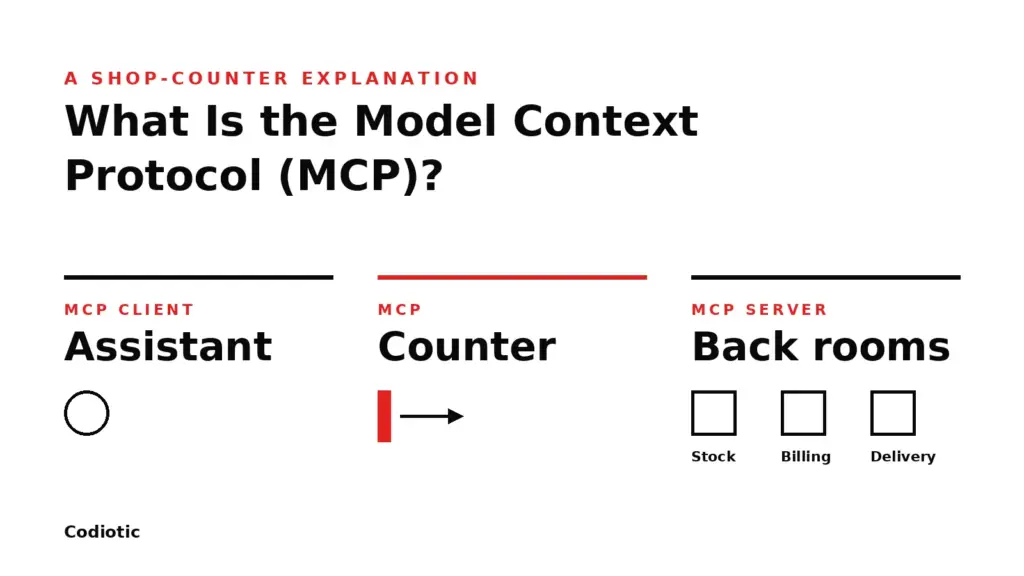
Over the past year, a three-letter term has appeared in almost every conversation about business AI: MCP, the Model Context Protocol. It is usually explained with diagrams full of arrows and acronyms, which is why many business owners nod politely and move on.
It does not need to be complicated. At Codiotic, we help businesses turn AI ideas into working software, and we explain the Model Context Protocol with something every owner understands: a shop counter.
What the Model Context Protocol Stands For
MCP stands for Model Context Protocol. It is an open standard that lets AI applications connect to outside tools and data in one consistent way. Those tools and data might be your inventory system, your calendar, your customer records or your files. Anthropic introduced it in November 2024.
That sentence is accurate, but it is not very helpful. Let us use the shop.
The Shop-Counter Example
Imagine a busy shop with a very capable assistant behind the counter. The assistant is knowledgeable, polite and quick. But there is a limit: the assistant only knows what is in their head. They cannot see the stock register, the billing system or the delivery desk, because those are in separate back rooms.
A customer walks in and asks: "Do you have the blue jacket in size M? And can you hold it for me until evening?"
To answer, the assistant needs to check stock and place a hold. Both of those live in the back rooms.
Without a Standard
Without MCP, every connection to a back room is built separately. The stock room has its own door, its own key and its own way of asking questions. The billing room has a completely different arrangement. So does the delivery desk.
If you hire a new assistant, or switch to a different one, all of those doors have to be rebuilt for that person. Every new back room means more custom work.
This is the situation many companies face today when they connect AI to their systems. Each combination of AI tool and business system needs its own custom integration.
With MCP
MCP is the standard counter. It sits between the assistant and the back rooms, and everyone agrees how it works.
- The assistant asks at the counter in one standard way.
- Each back room is set up once to answer at the counter in that standard way.
- The counter has a clear menu of what can be asked and what can be done.
Now the assistant can ask the stock room, "Is the blue jacket, size M, available?" and ask the order desk, "Please hold it until 6 pm."
Any assistant that knows the standard can use the same counter. And any back room that offers the standard can serve any assistant.
You have met this idea before. It works like a universal charger: one standard connection that works across many devices, instead of a different cable for each.
The Technical Words, Translated
When you read about the Model Context Protocol, three terms appear most often.
- MCP client: The assistant side, meaning the AI application that needs to ask for something.
- MCP server: The back-room side, meaning the program that exposes a system, such as stock, files or a calendar, in the standard way.
- Tools, resources and prompts: The menu at the counter. Tools are actions, resources are information to read and prompts are ready-made instructions.
Why the Model Context Protocol Matters for Business
MCP is not just another technical standard. It can make business AI integrations easier to build, maintain and reuse.
1. Less custom work. Connect a system once, and different AI applications that support MCP can use that connection.
2. More freedom. You can change the AI application you use without rebuilding every connection from scratch.
3. A growing ecosystem. Many ready-made connectors already exist for common business tools, so you do not always have to start from zero.
4. Neutral ground. In December 2025, Anthropic donated MCP to the Agentic AI Foundation, a fund under the Linux Foundation. Anthropic, Block and OpenAI co-founded the foundation, with support from Google, Microsoft, AWS, Cloudflare and Bloomberg. This helps establish MCP as an industry-governed standard rather than one controlled by a single company.
If you are planning agents on top of these connections, see our guide to AI agents for small business.
What the Model Context Protocol Is Not
A few clarifications save a lot of confusion.
- It is not an AI model. It is the way a model connects to the outside world.
- It is not an agent. An agent decides what to do. MCP provides the counter the agent uses.
- It is not automatically safe. A counter that gives access to everything is a risk, however neat it looks.
- It does not fix bad data or unclear processes. If your stock register is wrong, the assistant will quote it confidently.
Keeping the Counter Safe
Because MCP gives an AI access to real systems, a few rules matter from the start.
- Give the least access needed. Begin with read-only. Letting the assistant look at stock is a very different decision from letting it change prices.
- Keep a person in the loop for actions that matter. Payments, deletions, refunds and messages to customers should need approval.
- Use connectors you trust. A server is a piece of software that will see your data. Choose reviewed and maintained ones, and understand what each can reach.
- Beware of hidden instructions. Content the assistant reads, such as an email or a web page, can contain text written to manipulate it. This is known as prompt injection. Limiting what the assistant is allowed to do limits the damage.
- Keep records. Log what was asked and what was done, so mistakes can be traced.
- Name an owner. Someone should be responsible for what each connection can do.
If the connection touches personal data, read our checklist of questions to ask before building an AI workflow that touches customer data.
How to Start With the Model Context Protocol
You do not need to connect everything. Start small:
- Pick one workflow with a clear benefit, such as answering stock and order questions.
- List the systems it needs to read from.
- Connect them read-only first.
- Test with real questions and check every answer against the source.
- Add actions only when the answers are reliable, and keep approval in place for sensitive ones.
A narrow start also avoids the traps behind why AI projects stall.
Building Smarter Business Connections With Codiotic
At Codiotic, we help businesses turn AI concepts into practical software solutions, intelligent integrations and business automation systems.
Whether you are exploring AI agents, connecting existing business tools or building custom software and automation, the goal is simple: make technology work better for your business.
Ready to connect AI to your tools safely? Talk to Codiotic or explore our solutions at codiotic.com.
Key Takeaway
MCP is the standard counter between AI assistants and the systems your business runs on. It makes connections simpler to build and easier to reuse.
It does not make them safe or useful automatically. That depends on what you allow behind the counter, who approves the actions and how clean your data is.
Which system in your business would you want an AI assistant to read first, and what would you allow it to do?
FAQ
What is the Model Context Protocol (MCP)?
The Model Context Protocol is an open standard that lets AI applications connect to outside tools and data in one consistent way. It works like a standard counter between an AI assistant and systems such as inventory, calendars, customer records and files. Anthropic introduced it in November 2024.
What is the difference between an MCP client and an MCP server?
The MCP client is the AI application that needs to ask for something. The MCP server is the program that exposes a system, such as stock, files or a calendar, in the standard way. The client asks at the counter and the server answers from the back room.
Is the Model Context Protocol safe for business data?
Not automatically. MCP gives an AI access to real systems, so safety depends on your setup. Use least-access permissions, begin read-only, require approval for payments, deletions and customer messages, use trusted connectors and keep logs.
Is MCP an AI agent?
No. An agent decides what to do. MCP is the standard connection the agent uses to reach tools and data. It is also not an AI model.
Who controls the Model Context Protocol?
In December 2025, Anthropic donated MCP to the Agentic AI Foundation, a fund under the Linux Foundation co-founded by Anthropic, Block and OpenAI. This moves it toward community-led, vendor-neutral governance.
